
Grammarly Review: Features, Pricing & Honest Verdict

Introduction
As someone who writes and edits content daily, finding a reliable assistant to streamline the writing process is essential. Grammarly has established itself as a leading AI-powered writing assistant designed to help users improve grammar, clarity, tone, and overall writing quality. Whether you are a student, professional, blogger, or content marketer, evaluating whether a writing assistant fits your workflow is crucial.
In this review, I break down both the Free and Pro plans, explore its AI writing assistance and plagiarism-checking capabilities, and weigh its pros and cons against alternatives like ProWritingAid and QuillBot. My goal is to provide an objective, hands-on evaluation of Grammarly’s features, pricing, strengths, and limitations so you can make an informed decision.
Quick Verdict & Key Takeaways
Grammarly Review: Our Overall Rating
-
Overall rating: 4.5/5 as a provisional editorial assessment, based on extensive hands-on testing across various content formats.
-
Best for: Everyday English writing, professional communication, blogging, and content creation.
-
Standout advantage: Convenient, real-time writing assistance combined with flexible AI-powered editing.
-
Biggest drawback: Advanced functionality requires a paid subscription, and AI suggestions occasionally miss the exact context or tone intended.
-
Final recommendation: A strong option for frequent English-language writers who want to improve accuracy, polish, and clarity without slowing down their workflow.
Grammarly at a Glance
| Category | Overview |
| Product | AI writing assistant |
| Free plan | Yes |
| Paid plan | Grammarly Pro |
| Grammar and spelling | Core functionality |
| Tone and clarity | Available capabilities vary by plan |
| AI rewriting | Available, subject to feature limits |
| Plagiarism checker | Paid-plan access, subject to current terms |
| AI detector | Included under eligible Pro terms |
| Best use case | Writing, proofreading, and professional communication |
Who Is Grammarly Best For?
-
Bloggers and affiliate marketers who publish English content regularly.
-
Professionals who write emails, reports, proposals, and presentations.
-
Students who want to improve grammar and writing clarity.
-
Freelancers communicating with international clients.
-
Non-native English speakers seeking more natural and polished writing.
Who Might Not Need Grammarly Pro?
-
Casual users who only need basic grammar correction.
-
Writers who rarely produce English-language content.
-
Authors who need in-depth developmental editing for long manuscripts.
-
Users whose primary need is paraphrasing rather than general writing assistance.
What Is Grammarly?
Understanding Grammarly and Its Core Purpose
Grammarly functions as an AI-powered writing assistant that goes far beyond traditional spellcheckers. In my testing, I found that it helps users identify grammar, spelling, punctuation, and clarity issues while actively shaping tone, sentence structure, and written communication. Unlike older tools that simply flag typos with red underlines, Grammarly understands context to suggest meaningful improvements.
How Does Grammarly Work?
The software analyzes text as you write across supported environments, identifying potential errors and offering suggested corrections in real time. It provides explanations for its suggestions, allowing you to learn as you write. Furthermore, it offers full-sentence rewrites and AI-assisted drafting, giving you the final say to accept, reject, or modify any recommendation.
Where Can You Use Grammarly?
-
Grammarly’s web-based writing environment.
-
Supported desktop applications for Windows and Mac.
-
Browser extensions for Chrome, Safari, Edge, and Firefox.
-
Compatible email and productivity applications (such as Gmail and Google Docs).
-
Supported mobile writing keyboards.
[PRO TIP]: Keep the browser extension active while drafting emails or quick outlines, but switch to the dedicated web editor when writing long-form articles to minimize interface distractions.
[INSERT SCREENSHOT: Grammarly browser extension sidebar active inside a Google Docs document, displaying real-time suggestions.]
Grammarly vs. Traditional Grammar Checkers
Traditional grammar checkers rely heavily on rigid rule lists, frequently flagging correct sentences or missing contextual errors entirely. Grammarly utilizes machine learning to understand sentence meaning and intended tone. Receiving actionable suggestions during the writing process saves considerable editing time, though human proofreading remains essential for complex or specialized content.
Grammarly Features: What Can It Actually Do?
Real-Time Grammar, Spelling, and Punctuation Correction
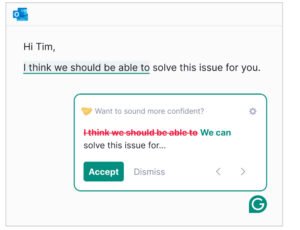
Grammarly excels at catching typos, punctuation errors, and commonly confused words instantly.
Original: “She don’t have enough informations to complete the report.”
Corrected: “She doesn’t have enough information to complete the report.”
In my testing, this real-time feedback drastically reduced initial proofreading friction, catching small oversight mistakes before manuscripts moved to formatting.
Clarity, Conciseness, and Readability Improvements
Writers often fall into the trap of using passive voice or overly convoluted phrasing. Grammarly highlights wordy sentences and suggests direct alternatives. However, I always recommend checking these suggestions against your personal voice to ensure the automated rewrite doesn’t strip away your unique writing style.
Tone Adjustment and Audience-Aware Writing
Tone detection is one of Grammarly’s most practical features for business writing. It evaluates whether your text sounds confident, friendly, formal, or neutral.
Suggested example: Transforming an informal client email into a more professional message while preserving the core meaning can be done with a single click in the sidebar.
Full-Sentence Rewrites and AI Writing Assistance
With Grammarly Pro, you receive a generous monthly allowance of generative-AI prompts (typically 2,000 prompts) that enable full-sentence rewrites, content expansion, and brainstorming. While I find this helpful for overcoming writer’s block, it is vital to fact-check any AI-generated output.
Grammarly Plagiarism Checker: How Does It Work?
For students and bloggers publishing public-facing content, the built-in plagiarism checker scans billions of web pages to identify matching text. While it helps ensure originality and proper citation, it cannot replace manual verification or guarantee complete protection against accidental duplication.
Grammarly AI Detector: Can It Identify AI-Written Content?
Grammarly includes an AI detection feature designed to highlight machine-generated passages. In my experience, while it serves as a helpful general indicator for educators and editors, detection results are not infallible and can produce false positives. Treat it as a guide rather than absolute proof.
[INSERT SCREENSHOT: Grammarly Pro interface displaying the sidebar metrics, including readability score, tone indicators, and plagiarism status.]
Generative AI and Productivity Features
Beyond editing, the platform supports drafting, outlining, and summarizing text directly inside your workspace. This streamlines repetitive tasks like writing meta descriptions or summarizing long client briefs.
Grammarly Integrations and Ease of Use
The onboarding experience is seamless. Once installed, the small floating Grammarly widget integrates cleanly into your favorite apps without causing major lag or workflow interruptions.
Privacy and Data Considerations
When handling sensitive client proposals or private documents, always review Grammarly’s privacy policy. Enterprises or individuals dealing with confidential data should ensure their settings align with their organization’s security standards.
Grammarly Pricing: Free vs. Pro
Grammarly Free: What Do You Get for $0?
The Free plan provides essential grammar, spelling, punctuation, and conciseness checks, along with tone detection and 100 monthly generative-AI prompts. It is an excellent starting point for occasional writers.
Grammarly Pro Cost: How Much Does It Cost?
| Plan | Current Price | Cost Over 12 Months |
| Grammarly Free | $0 | $0 |
| Grammarly Pro — annual billing | $12 per member/month | $144 / year |
| Grammarly Pro — monthly billing | $30 per member/month | $360 / year |
Annual billing offers a significant saving of $216 over the course of a year compared to paying month-to-month. Keep in mind that local taxes and regional pricing variations may apply.
Grammarly Pro vs. Free: What’s the Difference?
| Feature | Grammarly Free | Grammarly Pro |
| Grammar and spelling | Yes | Yes |
| Punctuation correction | Yes | Yes |
| Advanced clarity suggestions | Limited | Expanded |
| Tone and style assistance | Basic capabilities | Additional capabilities |
| Sentence rewrites | Limited / plan-dependent | Expanded access |
| AI writing assistance | 100 monthly prompts | 2,000 monthly prompts |
| Plagiarism checker | Not included | Included |
| AI detector | Verify current access | Included |
Annual vs. Monthly Billing: Which Is Better Value?
If you rely on writing for your daily livelihood or business, committing to the annual plan at $144 provides the best economic value. Monthly billing ($30/month) is best reserved for short-term projects where you only need advanced tools for a month or two.
Is Grammarly Pro Worth the Extra Cost?
For frequent writers, the time saved during editing easily justifies the annual investment. However, if you only write a few short emails a week, the Free plan will suffice.
Grammarly Discounts, Trials, and Cancellation Policies
Official promotional discounts or seasonal trials occasionally appear on Grammarly’s checkout page. Always review their cancellation terms and refund policies before finalizing your subscription.
[VERDICT]: If you write more than 5,000 words a week across blogs, emails, or marketing copy, upgrading to Grammarly Pro pays for itself in time saved.
Grammarly Pros and Cons: An Honest Assessment
Grammarly Pros
-
Easy to use: Writing suggestions integrate smoothly into supported daily workflows.
-
Real-time corrections: Catches typos and spelling mistakes as you type.
-
Improved clarity: Makes wordy sentences crisp and readable.
-
Tone assistance: Adapts formal and informal communication effortlessly.
-
Broad usefulness: Functions seamlessly across emails, reports, and blog posts.
-
AI-powered editing: Accelerates drafting and rewriting routines.
-
Free starting option: Core tools are accessible without upfront payment.
Grammarly Cons
-
Paid gating: Advanced rewriting and plagiarism tools require a Pro subscription.
-
Context blindness: Suggestions can occasionally be overly prescriptive or alter your intended meaning.
-
Not a human editor: Complex structural and developmental editing still requires a human touch.
-
AI detection variance: Detection metrics are indicative rather than definitive.
-
Subscription cost: The monthly rate can feel steep for casual users.
Is Grammarly Accurate and Reliable?
Grammarly’s grammar and spelling engines are remarkably reliable. However, its stylistic recommendations require a critical human eye. I always review major sentence rewrites before accepting them to ensure my original voice remains intact.
Who Gets the Most Value From Grammarly?
Frequent content creators, affiliate marketers, remote professionals, and non-native English speakers benefit the most from Grammarly’s real-time feedback loop.
Grammarly vs. Alternatives: ProWritingAid vs. QuillBot
Grammarly vs. ProWritingAid
ProWritingAid is tailored toward deep manuscript analysis, long-form fiction, and technical writing reports. Grammarly, by contrast, shines in everyday communication, browser integration, and clean user experience. ProWritingAid’s standard annual plan runs around $120/year, making it slightly cheaper than Grammarly Pro.
Grammarly vs. QuillBot
QuillBot specializes heavily in paraphrasing, rephrasing, and vocabulary spinning. While Grammarly offers sentence rewrites as part of its broader AI toolkit, QuillBot is built specifically for users whose primary goal is rewriting existing blocks of text. QuillBot Premium typically costs around $120/year annually.
Grammarly vs. ProWritingAid vs. QuillBot: Comparison Table
| Category | Grammarly Pro | ProWritingAid | QuillBot Premium |
| Core strength | Everyday grammar, clarity, and tone | Deep style and long-form analysis | Paraphrasing and sentence rewriting |
| Grammar correction | Core capability | Core capability | Available |
| Rewriting / paraphrasing | Full-sentence rewrites & AI assistance | Strong editing support | Primary strength |
| Plagiarism checker | Included with Pro | Verify current plan inclusions | Verify current plan inclusions |
| AI detector | Included with Pro | Not its primary focus | Not its primary focus |
| Best for | Professionals, students, and bloggers | Authors and long-form writers | Writers focusing on rephrasing text |
Which Grammarly Alternative Should You Choose?
Choose Grammarly for everyday productivity, email drafting, and blogging. Consider ProWritingAid if you write long-form books or detailed reports, and look at QuillBot if paraphrasing is your primary daily task.
Final Verdict: Is Grammarly Pro Worth It?
Our Final Grammarly Review Verdict
Grammarly remains an industry-leading writing companion. While its subscription cost requires consideration, the combination of real-time error correction, robust tone controls, and generative-AI features makes it an invaluable asset for active writers.
Should You Upgrade From Grammarly Free to Pro?
-
Stick with Free if: You write occasionally, only need basic spelling checks, and rarely use advanced rewriting features.
-
Upgrade to Pro if: You write English content daily, publish blog posts or marketing copy regularly, and can utilize plagiarism and AI-detection tools in your workflow.
Is Grammarly Pro Worth It for Bloggers and Affiliate Marketers?
For content creators and affiliate marketers, producing clean, engaging copy quickly is vital. Grammarly helps catch embarrassing typos in product reviews and tightens marketing copy, though human fact-checking and firsthand product evaluation remain irreplaceable.
Our Recommendation
Start with Grammarly Free to test the interface against your writing routine. When you find yourself hitting feature limits or desiring advanced rewrites, upgrade to the annual Pro plan to secure the best value.
Primary CTA: Try Grammarly and Find the Right Plan for Your Writing Needs.
Secondary CTA: Compare Grammarly Free and Pro Before Upgrading.
Frequently Asked Questions About Grammarly
Is Grammarly Pro Worth It?
Grammarly Pro is worth it for frequent English writers who benefit from advanced editing, rewriting, plagiarism detection, and AI tools. Occasional writers will find the Free plan more than adequate.
How Much Does Grammarly Pro Cost?
Grammarly Pro costs $12 per member per month when billed annually ($144/year) or $30 per member per month when billed monthly.
Is Grammarly’s AI Detector Accurate?
Grammarly’s AI detector serves as an indicator rather than absolute proof of authorship. It can produce false positives and false negatives, so results should be interpreted cautiously alongside your drafting history.
Does Grammarly Have a Plagiarism Checker?
Yes, Grammarly offers plagiarism-checking functionality under eligible paid plans, helping you identify matching web text and ensure proper citation practices.
Suggested internal links for SiftGain:
-
Other AI writing assistant reviews
-
AI content creation tools and software comparisons
-
Guides to blogging and affiliate marketing workflows